

Table of Contents
ToggleWhy Businesses Get Low-Quality Leads From Online Ads?
Let me tell you how this usually starts. A founder proudly says,
“We’re generating 180 leads every month. CPL is the lowest it’s ever been.”
The agency presents clean dashboards. CTR is strong. Impressions are growing. Cost per lead is down 25%.
But then sales speaks up.
“Half of these leads don’t answer calls.
Most can’t afford us.
Some don’t even know what we do.”
Revenue hasn’t moved. Now the founder is stuck in a dangerous place:
The ad metrics look healthy.
The sales team is frustrated.
The agency wants to increase its budget.
Stopping ads feels risky.
I’ve seen this pattern repeatedly while auditing real Google and Meta ad accounts. The dashboard celebrates activity. The business needs profitability. And those are not the same thing.
This is exactly where experienced digital marketing experts for business growth step in — not to optimize vanity metrics, but to align advertising strategy with revenue, qualification standards, and real customer value.
Most articles will blame:
Targeting
Creatives
Landing page copy
But that’s surface-level advice. In reality, low-quality leads usually happen because:
The business optimized for volume instead of revenue.
The definition of a “good lead” was never clarified.
Sales feedback never reached the ad platform.
The offer attracted the wrong segment.
Scaling happened before validation.
The platform did exactly what it was asked to do: Generate more leads at a lower cost. It was never told to generate profitable customers. That distinction is where money is either protected — or burned.
If you’re getting high lead volume but low sales, this is not an algorithm problem. It’s a system problem. And until you diagnose it properly, increasing the budget will only multiply the damage.

The Real Reasons Businesses Attract Junk Leads
1. Optimizing for the Cheapest CPL
If your KPI is “lower cost per lead,” the platform will find the cheapest humans willing to fill a form.
That does NOT mean:
- They can afford you
- They are serious
- They understand your offer
- They are decision-makers
Platforms optimize for event completion, not revenue. When you chase cheap CPL, you attract:
- Price shoppers
- Students
- Competitors
- Time-pass inquiries
I’ve audited accounts where:
- CPL dropped from ₹1,200 to ₹400
- Lead-to-sale ratio collapsed from 18% to 4%
Revenue fell. But CPL looked amazing.
2. Broad Targeting Without Intent Filters
On Meta Ads, interruption marketing dominates. On Google Ads, search intent matters — but only if you control it. Without:
Negative Keywords
Negative keywords prevent your ads from showing for irrelevant searches that will never convert into paying customers. They filter out queries like “free,” “jobs,” “course,” or “salary” that waste the budget and attract non-buyers. Without a strong negative keyword list, you pay for curiosity instead of intent.
Match-Type Control
Match-type control determines how tightly your ads match user searches. Broad match expands reach but often lowers intent, while phrase and exact match improve relevance and lead quality. If you don’t control match types, Google expands into unrelated searches — increasing volume but reducing profitability.
Search Term Monitoring
Search term monitoring means reviewing the actual queries triggering your ads. This reveals hidden budget leaks, irrelevant traffic, and intent gaps. Weekly monitoring helps you refine targeting, add negatives, and protect lead quality before wasted clicks turn into wasted money.
3. Weak Landing Pages Attract Everyone
If your page:
- Hides pricing
- Promises “Free Consultation”
- Has zero qualification
- Has a 5-field form
You are telling the internet: “Anyone can apply.”
High conversion rate does NOT equal high-quality lead rate.Friction filters. No friction floods.
4. No Negative Keyword Strategy (Google Ads)
I routinely see:
- 0 negative keyword lists
- Broad match chaos
- Smart campaigns running blind
That’s not scaling.That’s surrendering control. Without negatives, Google expands into:
- Research intent
- Educational queries
- DIY searches
You pay for traffic that will never convert into revenue.
5. Lead Forms With Zero Qualification
If your form doesn’t ask:
- Budget range
- Timeline
- Business size
- Decision authority
Then your sales team becomes your filter. That’s expensive. Marketing should pre-qualify. Sales should close.
6. Sales & Marketing Disconnect
Marketing reports:
- 200 leads
- 6% CTR
- ₹600 CPL
Sales reports:
- 14% unreachable
- 35% price objections
- 20% irrelevant
- 6% closed
But no one connects CRM status to ad campaigns. If CRM data doesn’t go back to ad platforms, the algorithm keeps learning from bad conversions. You are training it to find junk.
7. Scaling Before Validating Lead Quality
When volume increases:
Audience Broadens
When you increase budget or loosen targeting, platforms expand into colder segments to maintain volume. This brings in people who are less aligned with your offer, lowering lead quality even if lead numbers increase.
Intent Drops
As campaigns scale, you move away from high-intent buyers into passive or curious users. These leads may fill forms but lack urgency, budget, or decision authority — hurting your close rate.
CPC Rises
Higher competition and broader reach increase cost per click. You end up paying more for lower-intent traffic, which inflates cost per acquisition even if CPL appears stable.
Competition Tightens
More advertisers enter auctions, especially in profitable niches. This pushes up bids, forces broader targeting, and reduces efficiency — making poor strategy more expensive than ever.
Scaling without:
- Cost per acquisition clarity
- Lead-to-sale ratio stability
- Revenue tracking
Is gambling. Platforms optimize for volume. Businesses survive on profitability.

Step-by-Step Diagnosis Framework
Step 1: Define What a “Good Lead” Actually Means
Audit:
What % of leads become revenue? Not:
- Form fills
- Calls
- MQLs
Real sales. If you don’t know:
- Lead-to-sale ratio
- Average ticket
- Sales cycle length
Pause scaling immediately.
Pro Tip:
Audit your last 50 leads manually. Categorize:
- Qualified
- Junk
- Unreachable
- Price mismatch
You’ll see the truth in 60 minutes.
Step 2: Check Campaign Objective & Optimization
Are you optimizing for:
- Leads?
- Conversions?
- Value?
On Meta, optimizing for “Leads” teaches the algorithm to find form fillers.
On Google, optimizing for Max Conversions without quality data magnifies junk.
If CRM isn’t integrated, smart bidding becomes dumb automation.
Mistake
Trusting automation without revenue signals.
Step 3: Targeting & Intent Layering
Search intent (Google) ≠ Interruption ads (Meta). If you sell high-ticket services:
Prioritize Bottom-of-Funnel Search Intent
Focus your budget on people actively searching with buying intent — queries that indicate urgency, service need, pricing interest, or immediate action. Bottom-of-funnel keywords reduce guesswork, shorten sales cycles, and improve lead-to-sale ratios because you’re targeting demand that already exists — not trying to create it.
Layer Meta with Qualification-Heavy Messaging
Use Meta not just to generate leads, but to filter them. Your ad copy and forms should clearly mention pricing ranges, target audience, and who the service is NOT for. This reduces impulse form fills and ensures that only serious, relevant prospects enter your pipeline — protecting sales time and improving overall profitability.
Step 4: Landing Page Qualification Filters
Add:
Pricing Transparency
Clearly displaying your pricing range filters out people who cannot afford your service before they submit a lead. It may reduce form fills, but it increases serious inquiries — protecting your sales team from wasting time on price-shocked prospects.
Who This Is NOT For
Stating who your service is not meant for repels unqualified leads upfront. Whether it’s budget limitations, project size, or readiness level, disqualifying the wrong audience improves overall lead quality and increases close rates.
Budget Dropdown
Adding a budget selection field forces prospects to self-identify their spending capacity. This instantly filters out low-budget inquiries and gives sales teams clarity before the first call — improving efficiency and forecasting.
Timeline Filter
A timeline field (e.g., “Immediately,” “1–3 months,” “Just exploring”) separates urgent buyers from casual browsers. This helps prioritize high-intent leads and prevents your team from treating low-urgency inquiries as hot prospects.
Step 5: Sales Feedback Loop & CRM Tracking
Mandatory:
Track Closed Revenue by Campaign
Stop measuring success at the lead stage. Track which campaigns actually generate paying customers and real revenue. When you connect closed deals to specific campaigns, you stop funding high-volume junk sources and double down only on what produces profit — not activity.
Feed Qualified Leads Back to Platforms
If you don’t send CRM-qualified leads (or closed deals) back into the ad platform, the algorithm keeps optimizing for basic form fills. Uploading qualified or revenue-based conversions trains the system to find people similar to your best customers — not just the easiest converters.
Exclude Junk Audiences
Build exclusion lists from:
- Unqualified lead segments
- Past junk submissions
- Irrelevant demographics
This prevents the platform from retargeting or re-finding low-quality profiles. Exclusion protects the budget and ensures you don’t keep paying to attract the same wrong audience repeatedly.
Without CRM feedback: You are optimizing blind.
Step 6: Scale or Pause Decision
Pause ads if:
- Lead-to-sale ratio <5%
- Sales team rejects >40%
- No CRM tracking
- Offer mismatch
Reduce budget if:
- CAC unclear
- Sales cycle unstable
Scale only when:
- 3 months consistent profitability
- Lead quality stable
- Cost per acquisition predictable
Scaling chaos magnifies chaos.

Real Case Studies
Case 1: Local Service Business (Home Renovation – India)
Monthly Budget: ₹2.5L
Platform: Google Ads
Before:
- CPL: ₹850
- 180 leads/month
- Lead-to-sale: 5%
- Revenue stagnant
Problem:
- Broad match keywords
- No negatives
- “Free Consultation” landing page
- No budget filter
Fix:
- Exact & phrase match focus
- 200+ negative keywords
- Added project budget dropdown (₹5L minimum)
- Integrated CRM revenue tracking
After 6 months:
- CPL: ₹1,400
- 95 leads/month
- Lead-to-sale: 18%
- Revenue up 42%
Lesson: Higher CPL. Better leads. More profit.
Case 2: B2B SaaS (High-Ticket Annual Contracts)
- Budget: ₹8L/month
- Platform: Meta + Google
Initial Trap:
- Meta lead forms generating ₹300 CPL
- 400 leads/month
- Sales team overwhelmed
- CAC distorted
Reality:
- 90% not decision-makers
- 60% wrong company size
Correction:
- Switched Meta to content + retargeting only
- Shifted budget to high-intent search
- Added qualification form with company size filter
- Pushed CRM-qualified data to ad platforms
6 Months Later:
- Leads: 120/month
- CPL: ₹1,800
- CAC reduced 28%
- Revenue doubled
Lesson: Volume lies. Qualification pays.

Market Context & Platform Reality
Across Google Ads and Meta Ads:
CPCs Have Risen Due to Auction Pressure
As more advertisers enter the same auctions, bids increase and cost per click rises — even if your strategy hasn’t changed. This means you’re paying more for the same traffic, so poor targeting or weak qualification becomes far more expensive.
AI Automation Pushes Broad Expansion
Modern ad platforms expand targeting automatically to maintain volume. While this increases reach, it often moves into colder audiences, reducing intent and lowering lead quality unless tightly controlled.
Algorithms Optimize for Conversion Events, Not Profit
Platforms optimize for the event you choose — usually form submissions or leads. They are not optimizing for closed revenue unless you explicitly feed that data back. Without revenue signals, the system finds the easiest converters, not the most profitable customers.
Attribution Models Often Inflate Assisted Conversions
Multi-touch and data-driven attribution models can credit campaigns that influenced — but did not directly drive — revenue. This creates an illusion of performance and can justify scaling campaigns that aren’t actually profitable.
Smart Bidding Without CRM Integration Increases Junk Volume
If smart bidding strategies (like Max Conversions) don’t receive qualified or closed-won data, they learn from every lead equally — including junk ones. Over time, this trains the algorithm to prioritize quantity over quality, amplifying low-intent traffic.

Real Testimonials
“We thought more leads meant growth. It didn’t. We were paying to filter people.”
Amit Sharma – Founder, Local Service Business
“Our agency kept showing CPL drops. But revenue wasn’t tracked. That was the blind spot.”
Neha Verma – Marketing Head, B2B Company
“70% of our leads couldn’t afford the course. Marketing didn’t know because nobody asked us.”
Rohit Mehta – Sales Manager, Education Brand
Proof & Screenshot
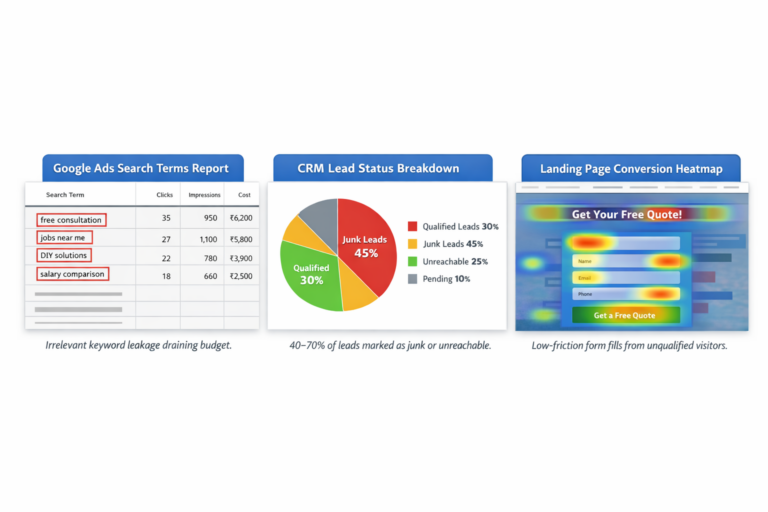
Conclusion:
Low-quality leads are rarely random.They are usually:
- Cheap-lead obsession
- Weak qualification
- No CRM feedback
- Misaligned offer
- Scaling too early
Cheap CPL feels productive.But it’s often expensive noise.
If you want clarity:Audit your last 50 leads before scaling.
Don’t trust the dashboard.Trust revenue.
If you’re serious about fixing lead quality, start with a Lead Quality Audit Checklist — and be brutally honest about what you find.
Why Businesses Get Low-Quality Leads From Online Ads?: FAQs
Competition likely increased, CPCs rose, and automation expanded targeting into colder audiences. If your qualification filters didn’t evolve, lead quality naturally declined.
If you sell high-intent services, prioritize search because it captures existing demand. Use Meta strategically for awareness and retargeting — not cold lead generation.
Ensuring safety on a construction site is crucial to protect workers
No. Often the problem is unclear offers, weak landing page filters, or poor qualification — not just audience targeting.
No. Increasing budget won’t fix bad lead quality. First fix targeting, messaging, and qualification — then scale.
If CRM tracking and proper optimization are in place, you should see clear directional improvement within 4–6 weeks.
references
About the Author